Описание
QuestDB — колонночная база данных для временных рядов и аналитики событий: приём данных через InfluxDB Line Protocol, PostgreSQL wire и REST, скорость вставок в миллионы строк в секунду благодаря append-only архитектуре и параллельному исполнению, SQL с расширениями SAMPLE BY и LATEST ON для временных рядов, обогащение потоков джойнами с таблицами, веб-консоль. Применяется для метрик, финансовых данных и IoT-потоков.
Что умеет:
— принимать потоки временных рядов;
— выполнять SQL-запросы с окнами;
— обогащать данные джойнами;
— работать с высокой скоростью вставок.
Полная документация ниже — автоматически из репозитория questdb/questdb (ветка master). Оригинальные материалы проекта распространяются на условиях его лицензии.






English |
简体中文
QuestDB is the open-source, low-latency time-series database on open formats.
It ingests millions of events per second, computes on live data in
milliseconds, and keeps years of history queryable. One SQL engine spans
ingestion, stream processing, and tiered storage.
The engine is zero-GC Java with C++ and Rust on the hot paths. Data lives in
memory-mapped, time-partitioned columns. Queries run across all cores with SIMD
and JIT-compiled filters. There are no third-party dependencies on the data
path.
Storage is tiered: a parallel write-ahead log, native columnar partitions,
and Apache Parquet. In open source you convert partitions to Parquet with
ALTER TABLE, or create a table in Parquet directly. QuestDB Enterprise
converts cold partitions automatically and tiers them to object storage.
Parquet, Apache Iceberg, and Apache Arrow keep the data open to any tool.
Measured on QuestDB 10.0 over QWP:
| Source | ||
|---|---|---|
| Peak ingestion per instance | 19M rows/sec | QWP vs ILP ingestion benchmark |
| Query results streamed to Arrow | 220M rows/sec | Streaming 500 million rows into Arrow |
| 500M rows streamed | 2.3 s | same post |
| First Arrow batch | 32 ms | same post |
Get started
Use Docker to start quickly:
docker run -p 9000:9000 -p 8812:8812 questdb/questdb
Or macOS users on Apple Silicon can use Homebrew:
brew install questdb
brew services start questdb
questdb start
questdb stop
QuestDB bundles native libraries for Apple Silicon only. On an Intel Mac, use
the Docker image above.
For the full walkthrough, start with the
quick start guide.
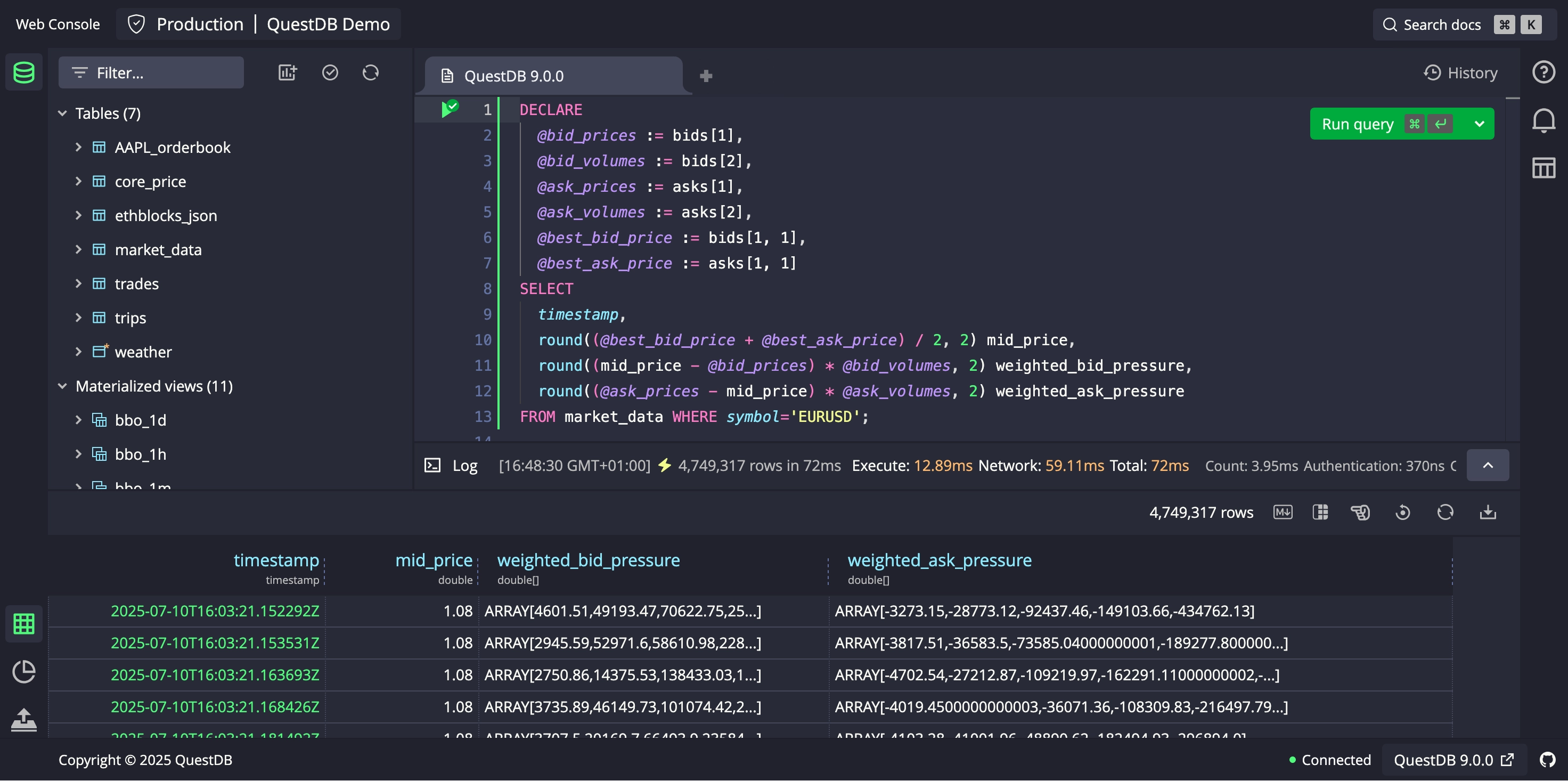
QuestDB Web Console – click to launch demo
New in QuestDB 10.0: the QuestDB Wire Protocol (QWP), one binary
columnar protocol for writes and for Arrow reads, plus native arrays and
live views in beta.
Release notes.
Ingress and egress over QWP
QWP is a binary columnar protocol over WebSocket. The same connection writes
rows in and streams query results back out as columns. The Python client
returns those columns as Apache Arrow by default, and Rust and C/C++ can
enable it with a flag.
On the way in, the
QWP vs ILP ingestion benchmark
measures 19M rows/sec over the network, and that peak holds from one
thousand to one million series. On the way out,
Streaming 500 million rows into Arrow
measures 220M rows/sec with eight readers, with the first batch after 32 ms
and client memory flat however large the result. The
QWP overview
covers the protocol design.
What QuestDB does
One engine covers the full lifecycle of the data:
- Capture. Ingest millions of ordered and out-of-order events per second
without pre-aggregation. Deduplication and out-of-order correction are built
in. - Compute. Transform, enrich, and aggregate events as they arrive.
Materialized views
aggregate by time slice, many rows in and one row out.
Live views run window
functions such as indicators, one row in and one row out, on an in-memory
tier. - Query. Run time-series SQL across live and historical data with
predictable low latency. - Retain. Keep the complete record online in native storage and Parquet,
queried through the same SQL. Enterprise tiers cold partitions to object
storage automatically.
The SQL is standard, extended where time series needs it: SAMPLE BY,
LATEST ON, ASOF JOIN, WINDOW JOIN, HORIZON JOIN, materialized views,
live views, and n-dimensional arrays.
Both queries run on the live demo:
-- 15-minute OHLCV bars for EURUSD, today
SELECT timestamp, symbol,
  first(price) AS open,
  max(price) AS high,
  min(price) AS low,
  last(price) AS close,
  sum(quantity) AS total_volume
FROM fx_trades
WHERE symbol = 'EURUSD'
  AND timestamp IN '$today'
SAMPLE BY 15m;

-- Match each trade to the most recent quote by timestamp
SELECT t.timestamp, t.symbol, t.price, q.bid_price, q.ask_price
FROM fx_trades t
ASOF JOIN core_price q ON (symbol)
WHERE t.timestamp IN '$today';
Where it runs:
- capital markets: tick data, order books, trades, pre-trade analysis and
post-trade analytics,
with the finance SQL cookbook,
finance functions and
order book analytics - aerospace and robotics: flight-test telemetry, fleet data, mission replay
- energy and infrastructure: reactor, turbine, and grid telemetry at full
resolution - AI coding agents,
through the agent skills and the MCP server
A time-series engine takes care of what a general database leaves to you:
out-of-order data, deduplication and exactly-once semantics, continuous
ingest under concurrent queries, bursty load, and schema changes while
streaming.
Try QuestDB, demo and dashboards
The live, public demo runs the latest QuestDB
release on sample datasets. Scan more than 2 billion rows in milliseconds:
- Trades: live crypto trades with 30M+ rows per month (OKX exchange)
- FX order book: live charts with orderbook FX pairs.
- Trips: 10 years of NYC taxi trips with 1.6 billion rows
We also have some public, real-time demo dashboards using
our Grafana-native plugin:
- Real-time crypto trades: executed
trades on OKX from more than 20 assets in real time - FX order book: live depth/imbalance charts for major FX pairs
QuestDB performance vs. other databases
TSBS ingestion at 100,000 hosts with 32 workers on one AWS r8a.8xlarge
(32 vCPU, 256 GB RAM). Competitors benchmarked August 2026, QuestDB 9.3.3 on
the same instance.
| Engine | Version | Ingestion rate |
|---|---|---|
| QuestDB | 9.3.3 | 8.59M rows/sec |
| ClickHouse | 26.7.5.10 | 1.75M rows/sec |
| TimescaleDB | 2.29.1 | 1.08M rows/sec |
| InfluxDB | 1.12.4 | 541K rows/sec |
The full comparisons, ingestion and queries:
- QuestDB vs InfluxDB
- QuestDB vs InfluxDB 3
- QuestDB vs ClickHouse
- QuestDB vs TimescaleDB
- QuestDB vs kdb+
As always, we encourage you to run your own benchmarks.
AI coding agents
QuestDB works with Claude Code, Codex, Cursor, and any MCP client. There are
two ways in.
Run SQL against the database from your agent. Install the
QuestDB skill. It teaches the agent
QuestDB’s SQL dialect and how to inspect a schema. The agent then executes SQL
through the
REST API.
npx skills add questdb/skills
Prototype in the Web Console. For notebooks and SQL prototyping driven by
the agent directly, connect it to the
Web Console MCP server.
Setup for each agent is in the
coding agents guide.
Connect and integrate
First-party clients
QuestDB clients for ingesting data and running queries over the QuestDB Wire
Protocol:
Connect to QuestDB
See the Connect overview for the
full picture.
The QuestDB Wire Protocol (QWP) is the native protocol and the recommended
way to talk to QuestDB. It is binary, streams in both directions over a single
connection on port 9000, and covers ingestion and queries through one
connect string. The first-party clients listed above speak it.
QuestDB also speaks compatibility protocols, so existing tooling works
unchanged:
- PostgreSQL Wire Protocol
on port8812: run queries from any Postgres driver such as psycopg, JDBC
or pgx, and from BI tools and ORMs. Inserts work too, but slower than QWP. - InfluxDB Line Protocol
on port9000, for collectors and pipelines that already emit ILP - REST API on port
9000, for HTTP scripting, cURL, and CSV import
For interactive use, the
Web Console
provides a SQL editor, charts, and CSV import on port 9000.
Popular third-party tools
Ingest from:
Query from:
The integrations overview
lists the rest.
End-to-end code scaffolds
From streaming ingestion to visualization with Grafana, start with code
scaffolds from our
quickstart repository.
Configure QuestDB for production workloads
Find our
capacity planning to
fine-tune QuestDB for production workloads.
QuestDB Enterprise
The QuestDB you already run, hardened for production. Enterprise adds:
- high availability: replication, read replicas, automatic failover
- multi-tier storage at petabyte scale: cold partitions tier automatically to
Parquet on object storage and stay queryable in place - security and governance: role-based access control, TLS, SSO, audit logs
- 24/7 support with a 99.9% uptime SLA
Run it on-prem, as a managed service, or inside your own AWS or Azure account
with Bring Your Own Cloud. See the
feature comparison and the
Enterprise page.
Additional resources
📚 Read the docs
- QuestDB documentation: begin the journey
- Product roadmap: check
out our plan for upcoming releases - Tutorials: learn what’s possible with QuestDB,
step by step
❓ Get support
- Community Discourse forum: join technical
discussions, ask questions, and meet other users! - Public Slack: chat with the QuestDB team and
community members - GitHub issues: report bugs or
issues with QuestDB - Stack Overflow: look for
common troubleshooting solutions
🚢 Deploy QuestDB
- Official Docker image
- Kubernetes Helm charts
- systemd
- AWS
- Azure
- Google Cloud Platform
- DigitalOcean
- Hetzner
- ZFS compression
- Bring Your Own Cloud (Enterprise)
Contribute
Contributions welcome!
We appreciate:
- source code
- documentation (see our
documentation repository) - bug reports
- feature requests or feedback.
To get started with contributing:
- Have a look through GitHub issues labelled
"Good first issue" - For Hacktoberfest, see the relevant
labelled issues - Read the
contribution guide - For details on building QuestDB, see the
build instructions - Create a fork
of QuestDB and submit a pull request with your proposed changes - Stuck? Join our public Slack for assistance
✨ As a sign of our gratitude, we send QuestDB swag to our contributors!
A big thanks goes to the following wonderful people who have contributed to
QuestDB emoji key:



















This project adheres to the
all-contributors
specification. Contributions of any kind are welcome!